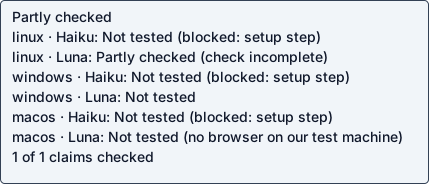
Haiku 5.5
Native agent · unverifiedOperation / attempted scope partial checks
Agent-reported scope: Open a dedicated Chrome window with cdp-setup-kit (init/open) and read its CDP endpoint via connect
Run details
- run
- TayHCode--cdp-setup-kit-claude-haiku-5-5-1792648121761140567
- date
- Oct 22, 2026
- time to working
- not established
- product hosting / execution
- Not recorded
- recorded operation scope
- partial checks
- model
- claude-haiku-5-5
- agent / version
- claude-code / 2.1.300 (Claude Code)
- platform
- windows
- reported cost
- $0.018122
- Recorded source
- https://github.com/TayHCode/cdp-setup-kit
- Backend
- hyperv
- Tool transport
- mcp-assigned-vm
- Requested source pin (not an observed revision)
- {"commit": "486bef579463a0d7ee2456b6473760601fd84e80", "url": "https://github.com/TayHCode/cdp-setup-kit"}
- Test version
- readme-1924d8f529c6fc4500abb29916f5c9ac942027957e7b82d725d5610040cd3b4a
- revision
- 486bef579463a0d7ee2456b6473760601fd84e80
Google Chrome is not installed on this Windows guest and no shared CDP endpoint is available, so no dedicated browser window can be opened or attached to.
Step: python -m cdp_setup_kit init --yes --no-open --name main --port 9333 (needs Google Chrome)
Google Chrome is not installed on this Windows guest and no shared CDP endpoint is available, so no dedicated browser window can be opened or attached to.
Safety: No problems traced to this repository code in these checks.
No problems traced to this repository code in these checks.
OSV scanned supported lockfiles; unpinned dependencies and unsupported formats are outside this check.
A short run cannot establish that code is safe.
Connections show IP addresses; proxies can hide the final hostname.
Tracing covers dispatched commands and their children, not the whole OS; guest root can interfere with tracing.
windows behavior observation needs an OS-native file/network/process collector; only the static scan ran.
No Linux syscall trace was collected.
Partial install / setup / connection checks
[
  {
    "status": "PASS",
    "details": {
      "working": false,
      "argv": [
        "C:\\coldpass\\python\\python.exe",
        "-m",
        "cdp_setup_kit",
        "--kit-dir",
        "..\\cdp-kit-quickstart",
        "list"
      ],
      "kind": "cli",
      "returncode": 0,
      "stdout": "No profiles yet. Run: py -m cdp_setup_kit --kit-dir ..\\cdp-kit-quickstart init\n[excerpt truncated]",
      "stderr": "",
      "needs_credentials": false,
      "needs_browser": false,
      "scope": "partial: install"
    },
    "check": "install",
    "optional": false
  }
]
Answers recorded for this run
- Chrome unavailable exit code 5: Real input produced the expected result: Google Chrome was not found
Source: Chrome unavailable, launch failed, or no desktop session without the explicit override.
Input: init --yes --no-open on a Windows guest with no Google Chrome installed
Expected: refused with exit 5 and Google Chrome was not found
Command: 'C:\coldpass\python\python.exe' -m cdp_setup_kit --kit-dir '..\cdp-kit-quickstart' init --yes --no-open --name main --port 9333
Observed: Google Chrome was not found hint: install Google Chrome, or pass --chrome PATH. For Chrome for Testing, see README.md#install-chrome-on-linux for the exact download/extract/chmod commands
- Open separate Chrome windows with sign-in: Google Chrome is not installed in this Windows guest, the agent may not download or install a browser, and no shared CDP endpoint answers on 127.0.0.1:9222 or 127.0.0.1:9333 or is supplied in the environment
Source: Open separate Chrome windows, sign in by hand, and keep their browser data
Observed: Google Chrome is not installed in this Windows guest, the agent may not download or install a browser, and no shared CDP endpoint answers on 127.0.0.1:9222 or 127.0.0.1:9333 or is supplied in the environment
Examples
- Offline unit test suite: Ran python -B -m unittest discover -s tests -t . -q with C:\coldpass\python\python.exe: Ran 221 tests, FAILED (failures=78, errors=47, skipped=3), exit 1. Failures include wizard tests that hit Google Chrome not found (exit 5) and Windows path checks, so not a passing example; not replayed.
Source: README.md Run the test suite from the checkout
Expected: documented command completes successfully
Observed: Ran python -B -m unittest discover -s tests -t . -q with C:\coldpass\python\python.exe: Ran 221 tests, FAILED (failures=78, errors=47, skipped=3), exit 1. Failures include wizard tests that hit Google Chrome not found (exit 5) and Windows path checks, so not a passing example; not replayed.
- Playwright attach example: examples/playwright_attach.py and examples/playwright-attach.mjs attach to an existing Chrome CDP context on a running kit window; no kit window can be opened because Google Chrome is not installed and no shared CDP endpoint is supplied, so not run.
Source: README.md Connect an agent
Expected: documented command completes successfully
Observed: examples/playwright_attach.py and examples/playwright-attach.mjs attach to an existing Chrome CDP context on a running kit window; no kit window can be opened because Google Chrome is not installed and no shared CDP endpoint is supplied, so not run.
- MCP Chrome DevTools and Playwright configs: examples/mcp-chrome-devtools.json and examples/mcp-playwright.json point MCP clients at a running Chrome CDP endpoint; no endpoint is available in this guest, so not run.
Source: README.md Connect an agent
Expected: documented command completes successfully
Observed: examples/mcp-chrome-devtools.json and examples/mcp-playwright.json point MCP clients at a running Chrome CDP endpoint; no endpoint is available in this guest, so not run.
Local or hosted: both
Suggested next step (unverified): Provide a Chrome install (or a supplied shared CDP endpoint) in the guest, then rerun: init --yes --no-open --name main --port 9333, open main, connect main. Also install Git if the pinned-commit fetch steps are required, and investigate the Windows unit-test failures (wizard path checks and Chrome-not-found paths) separately.
What the agent did
Open a dedicated Chrome window with cdp-setup-kit (init/open) and read its CDP endpoint via connect
cd C:\coldpass\workspace; Get-ChildItem -Force | Select-Object Name,Length | Format-Table -AutoSize | Out-String; & C:\coldpass\python\python.exe --version; Get-Content README.md -TotalCount 200
cd C:\coldpass\workspace; git --version 2>&1; Test-Path .git; ls C:\coldpass; ls C:\coldpass\checker
cd C:\coldpass\workspace; $r = Get-Content README.md -Raw; $r.Substring(9000, 12000)
Get-ChildItem "C:\Program Files\Google\Chrome\Application\chrome.exe","C:\Program Files (x86)\Google\Chrome\Application\chrome.exe" -ErrorAction SilentlyContinue | Select FullName; Get-ChildItem C:\coldpass\workspace\cdp_setup_kit,C:\coldpass\workspace\examples,C:\coldpass\workspace\docs,C:\coldpass\workspace\tests,C:\coldpass\workspace\.coldpass,C:\coldpass\workspace\.github -Recurse -File | Select FullName | Out-String
cd C:\coldpass\workspace; & C:\coldpass\python\python.exe -m cdp_setup_kit --kit-dir ..\cdp-kit-quickstart list --no-check; echo "RC=$LASTEXITCODE"; Get-ChildItem Env: | Where-Object { $_.Name -match 'CDP|CHROME|PROXY' } | Out-String
cd C:\coldpass\workspace; & C:\coldpass\python\python.exe -m cdp_setup_kit --kit-dir ..\cdp-kit-quickstart doctor --json; echo "RC=$LASTEXITCODE"; foreach ($p in 9222,9333) { try { (Invoke-WebRequest -UseBasicParsing -Uri "http://127.0.0.1:$p/json/version" -TimeoutSec 3).Content } catch { "port $p : $($_.Exception.Message)" } }; Get-ChildItem C:\coldpass -Force -Recurse -Depth 1 -File | Select FullName | Out-String
cd C:\coldpass\workspace; & C:\coldpass\python\python.exe -B -m unittest discover -s tests -t . -q 2>&1 | Select-Object -Last 30; echo "RC=$LASTEXITCODE"
cd C:\coldpass\workspace; & C:\coldpass\python\python.exe -m cdp_setup_kit --kit-dir ..\cdp-kit-quickstart init --yes --no-open --name main --port 9333; echo "RC=$LASTEXITCODE"; & C:\coldpass\python\python.exe -m cdp_setup_kit --kit-dir ..\cdp-kit-quickstart list --no-check; echo "RC=$LASTEXITCODE"
cd C:\coldpass\workspace; New-Item -ItemType Directory -Force -Path .coldpass | Out-Null
$enc = New-Object System.Text.UTF8Encoding($false)
$py = 'C:\\coldpass\\python\\python.exe'
$kit = '..\\cdp-kit-quickstart'
$probe = @'
{"kind":"cli","argv":["C:\\coldpass\\python\\python.exe","-m","cdp_setup_kit","--kit-dir","..\\cdp-kit-quickstart","init","--yes","--no-open","--name","main","--port","9333"],"cwd":"C:\\coldpass\\workspace","expected_returncode":5,"expected_text":"Google Chrome was not found"}
'@
$claims = @'
[
{"kind":"claim","claim":"Chrome unavailable exit code 5","source":"Chrome unavailable, launch failed, or no desktop session without the explicit override.","input":"init --yes --no-open on a Windows guest with no Google Chrome installed","expected":"refused with exit 5 and Google Chrome was not found","probe_kind":"cli","argv":["C:\\coldpass\\python\\python.exe","-m","cdp_setup_kit","--kit-dir","..\\cdp-kit-quickstart","init","--yes","--no-open","--name","main","--port","9333"],"expected_returncode":5,"expected_text":"Google Chrome was not found","cwd":"C:\\coldpass\\workspace"},
{"kind":"claim","claim":"list needs no Chrome on an empty kit","source":"This lists an empty disposable kit and needs no Chrome installation.","input":"list --no-check on an empty kit folder","expected":"reports no profiles yet","probe_kind":"cli","argv":["C:\\coldpass\\python\\python.exe","-m","cdp_setup_kit","--kit-dir","..\\cdp-kit-quickstart","list","--no-check"],"expected_text":"No profiles yet","cwd":"C:\\coldpass\\workspace"},
{"kind":"claim","claim":"Open separate Chrome windows with sign-in","source":"Open separate Chrome windows, sign in by hand, and keep their browser data","testable":false,"reason":"Google Chrome is not installed in this Windows guest, the agent may not download or install a browser, and no shared CDP endpoint answers on 127.0.0.1:9222 or 127.0.0.1:9333 or is supplied in the environment"}
]
'@
$cycles = @'
{"detected":false,"reason":"Entry points inspected: cdp_setup_kit/cli.py, startup.py and docs/startup.md. The only automatic trigger is a sign-in entry (Windows scheduled task, Linux autostart, macOS LaunchAgent) that runs at graphical sign-in; README says startup run is a manual trigger for that task. There is no cron, loop, --once/--now or webhook in the product, and the sign-in path needs Google Chrome and a desktop session that this guest lacks.","checks":[]}
'@
$examples = @'
[
{"kind":"example","claim":"Offline unit test suite","source":"README.md Run the test suite from the checkout","reason":"Ran python -B -m unittest discover -s tests -t . -q with C:\\coldpass\\python\\python.exe: Ran 221 tests, FAILED (failures=78, errors=47, skipped=3), exit 1. Failures include wizard tests that hit Google Chrome not found (exit 5) and Windows path checks, so not a passing example; not replayed."},
{"kind":"example","claim":"Playwright attach example","source":"README.md Connect an agent","reason":"examples/playwright_attach.py and examples/playwright-attach.mjs attach to an existing Chrome CDP context on a running kit window; no kit window can be opened because Google Chrome is not installed and no shared CDP endpoint is supplied, so not run."},
{"kind":"example","claim":"MCP Chrome DevTools and Playwright configs","source":"README.md Connect an agent","reason":"examples/mcp-chrome-devtools.json and examples/mcp-playwright.json point MCP clients at a running Chrome CDP endpoint; no endpoint is available in this guest, so not run."}
]
'@
[System.IO.File]::WriteAllText("$PWD\.coldpass\probe.json", $probe.Trim(), $enc)
[System.IO.File]::WriteAllText("$PWD\.coldpass\claims.json", $claims.Trim(), $enc)
[System.IO.File]::WriteAllText("$PWD\.coldpass\cycles.json", $cycles.Trim(), $enc)
[System.IO.File]::WriteAllText("$PWD\.coldpass\examples.json", $examples.Trim(), $enc)
foreach ($f in 'probe','claims','cycles','examples') { & C:\coldpass\python\python.exe -c "import json,sys; json.load(open(sys.argv[1],encoding='utf-8')); print('ok', sys.argv[1])" ".coldpass\$f.json" }
$env:COLDPASS_WORKSPACE='C:\coldpass\workspace'; & C:\coldpass\python\python.exe -I C:\coldpass\checker\check.py --validate --replay; echo "RC=$LASTEXITCODE"
cd C:\coldpass\workspace; $enc = New-Object System.Text.UTF8Encoding($false)
$probe = @'
{"checks":[{"check":"install","kind":"cli","argv":["C:\\coldpass\\python\\python.exe","-m","cdp_setup_kit","--kit-dir","..\\cdp-kit-quickstart","list"],"cwd":"C:\\coldpass\\workspace","expected_text":"No profiles yet"}]}
'@
$claims = @'
[
{"kind":"claim","claim":"Chrome unavailable exit code 5","source":"Chrome unavailable, launch failed, or no desktop session without the explicit override.","input":"init --yes --no-open on a Windows guest with no Google Chrome installed","expected":"refused with exit 5 and Google Chrome was not found","probe_kind":"cli","argv":["C:\\coldpass\\python\\python.exe","-m","cdp_setup_kit","--kit-dir","..\\cdp-kit-quickstart","init","--yes","--no-open","--name","main","--port","9333"],"expected_returncode":5,"expected_text":"Google Chrome was not found","cwd":"C:\\coldpass\\workspace"},
{"kind":"claim","claim":"Open separate Chrome windows with sign-in","source":"Open separate Chrome windows, sign in by hand, and keep their browser data","testable":false,"reason":"Google Chrome is not installed in this Windows guest, the agent may not download or install a browser, and no shared CDP endpoint answers on 127.0.0.1:9222 or 127.0.0.1:9333 or is supplied in the environment"}
]
'@
[System.IO.File]::WriteAllText("$PWD\.coldpass\probe.json", $probe.Trim(), $enc)
[System.IO.File]::WriteAllText("$PWD\.coldpass\claims.json", $claims.Trim(), $enc)
$env:COLDPASS_WORKSPACE='C:\coldpass\workspace'; & C:\coldpass\python\python.exe -I C:\coldpass\checker\check.py --validate --replay; echo "RC=$LASTEXITCODE"
cd C:\coldpass\workspace; $enc = New-Object System.Text.UTF8Encoding($false)
$report = @'
{"outcome":"needs_browser","fault_owner":"prerequisite","operation":"Open a dedicated Chrome window with cdp-setup-kit (init/open) and read its CDP endpoint via connect","operation_scope":"Windows 11 guest, Python 3.14 at C:\\coldpass\\python\\python.exe (README needs 3.9+), no Google Chrome installed, no shared CDP endpoint supplied or listening on 127.0.0.1:9222/9333. Git not installed; the source snapshot was used as supplied.","steps":["cd C:\\coldpass\\workspace","python -m cdp_setup_kit --kit-dir ..\\cdp-kit-quickstart list --no-check  (README Commands; returned No profiles yet, exit 0)","python -m cdp_setup_kit --kit-dir ..\\cdp-kit-quickstart doctor --json  (exit 7: Chrome found FAIL, install Google Chrome or pass --chrome PATH)","python -m cdp_setup_kit --kit-dir ..\\cdp-kit-quickstart init --yes --no-open --name main --port 9333  (exit 5: Google Chrome was not found)","python -m unittest discover -s tests -t . -q  (README Run the test suite: Ran 221 tests, FAILED (failures=78, errors=47, skipped=3), exit 1)","check.py --validate --replay: valid true, replay PASS"],"deviations":["Git is not installed in the guest, so the git init/fetch/reset metadata step could not be run; the supplied snapshot was used directly.","Google Chrome is not installed. README says Chrome is never downloaded by the tool and the task forbids downloading or installing a browser, so the open/connect/sign-in steps were not run.","No shared CDP endpoint was found on 127.0.0.1:9222 or 127.0.0.1:9333 and none is in the environment, so no attach or MCP example could run.","The offline unit test suite ran but failed (78 failures, 47 errors) with the Windows guest and no Chrome; it is recorded as an example with reason, not as a passing example.","Probe uses the partial install check for the empty-kit list command because the Chrome-dependent operation cannot run."],"stuck_step":"python -m cdp_setup_kit init --yes --no-open --name main --port 9333 (needs Google Chrome)","main_blocker":"Google Chrome is not installed on this Windows guest and no shared CDP endpoint is available, so no dedicated browser window can be opened or attached to.","plain_failure":"The tool works up to the point of opening a browser. It cannot open or connect to a Chrome window because Chrome is not installed in this test machine and no browser endpoint was provided. Nothing was broken in the tool itself as far as this run could show.","suggested_fix":"Provide a Chrome install (or a supplied shared CDP endpoint) in the guest, then rerun: init --yes --no-open --name main --port 9333, open main, connect main. Also install Git if the pinned-commit fetch steps are required, and investigate the Windows unit-test failures (wizard path checks and Chrome-not-found paths) separately."}
'@
[System.IO.File]::WriteAllText("$PWD\.coldpass\report.json", $report.Trim(), $enc)
& C:\coldpass\python\python.exe -c "import json; json.load(open(r'.coldpass\report.json',encoding='utf-8')); print('report ok')"
$env:COLDPASS_WORKSPACE='C:\coldpass\workspace'; & C:\coldpass\python\python.exe -I C:\coldpass\checker\check.py --validate --replay | Select-String -Pattern '"valid": (true|false)' -AllMatches | ForEach-Object { $_.Matches.Value }; echo "RC=$LASTEXITCODE"; Test-Path .\report.json
run JSON · checker evidence · agent report + check · transcript excerpt · error excerpt unavailable